Visit this website to download F-Secure Internet Security 2009 with 3 months license.
F-Secure is the name of the company that locate in Sweden.

To secure your router, you need configurable the password on your router. The password must be difficultly to guess. On Cisco Router, you can configure the password for line console, vty (telnet service) and password to access to EXEC mode. In turn, I will show you how to configure the password for three mode as mentioned above.
1. Console port for login local to the Router, the terminator must be attached directly to Router through this console port. To configure password for console port, you must execute the following command in Configuration mode
line console 0
password cisco
login
Password is cisco
2. Line VTY is responsible for enable the Telnet service on the Router. Execute the following command in Configuration mode
line vty 0 4
password cisco
login
To indicate specially the username and password for each user to telnet to the Router, you can configure a username and a password. To do this, execute the follwing command in Configuration Mode:
username thaolv password 0 thaolv
line vty 0 4
login local
exit
After this, you can telnet to this Rotuer by provide your username and password that configured. Here is the username: thaolv and password: thaolv
3. Enabling password for EXEC mode, you must execute the following command in Configuration mode:
enable secret cisco
By default, Password for the EXEC mode is encrypted in MD5 algorithm, Password for the line VTY and the line Console is not encrypted, but you can configure to encrypt these password by following command in Configuration mode:
service password-encryption
Now, your password for the line VTY and the line Console is encrypted in MD7 algorithm. Verify this by execute the following command in EXEC mode:
show running-configR2#show run
Building configuration...
Current configuration : 893 bytes
!
version 12.4
service timestamps debug datetime msec
service timestamps log datetime msec
service password-encryption
!
hostname R2
!
boot-start-marker
boot-end-marker
!
!
no aaa new-model
memory-size iomem 5
!
!
ip cef
!
!
!
username thaolv privilege 15 password 7 09584608160901
!
!
!
interface Loopback0
ip address 2.2.2.2 255.255.255.0
!
interface Serial0/0
ip address 172.16.1.2 255.255.255.252
ip rip receive version 1 2
serial restart-delay 0
clock rate 64000
!
interface Serial0/1
no ip address
shutdown
serial restart-delay 0
!
interface Serial0/2
no ip address
shutdown
serial restart-delay 0
!
interface Serial0/3
no ip address
shutdown
serial restart-delay 0
!
router rip
version 2
passive-interface Loopback0
network 2.0.0.0
network 172.16.0.0
no auto-summary
!
ip http server
!
!
!
!
!
control-plane
!
!
line con 0
line aux 0
line vty 0 4
login local
!
end
This song make me happy when i don't know what to do or when i am alone. I always sing this song to make me better. This song really is good song, hearing and feeling thank Westlife
"Flying Without Wings"
[Shane:]
Everybody's looking for that something
One thing that makes it all complete
You'll find it in the strangest places
Places you never knew it could be
Some find it in the face of their children
Some find it in their lover's eyes
Who can deny the joy it brings
When you've found that special thing
You're flying without wings
[Mark:]
Some find it sharing every morning
Some in their solitary lives
You'll find it in the words of others
A simple line can make you laugh or cry
You'll find it in the deepest friendship
The kind you cherish all your life
And when you know how much that means
You've found that special thing
You're flying without wings
So, impossible as they may seem
You've got to fight for every dream
Cos who's to know which one you let go
Would have made you complete
[Shane:]
Well, for me it's waking up beside you
To watch the sunrise on your face
To know that I can say I love you
In any given time or place
[Mark:]
It's little things that only I know
Those are the things that make you mine
And it's like flying without wings
Cos you're my special thing
I'm flying without wings
[Shane:]
And you're the place my life begins
And you'll be where it ends
[Mark:]
I'm flying without wings
And that's the joy you bring
I'm flying without wings
I posted many themes for Windows 7 in previous post, such as Ferari theme for Windows 7, Windows 7 Box Art Theme. Today, i introduce Mac OS X Snow Leopard Theme for Windows 7. These themes will only work on Windows 7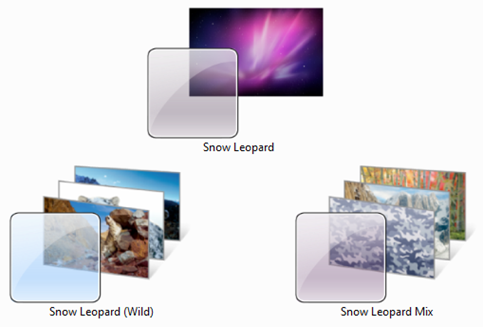
To download you can click link below
Download Mac OS X Snow Leopard Themes Pack for Windows 7
Today, i will introduce you Basic OSPF Configuration. Topology in this lab:
Today, i will introduce you Basic OSPF Configuration. Topology in this lab:

Task 1: Perform Basic Router Configurations.
Perform basic configuration of the R1, R2, and R3 routers according to the following guidelines:
1. Configure the router hostname.
2. Disable DNS lookup.
3. Configure an EXEC mode password.
4. Configure a message-of-the-day banner.
5. Configure a password for console connections.
6. Configure a password for VTY connections.
Task 2: Configure and Activate Serial and Ethernet Addresses.
Step 1: Configure interfaces on R1, R2, and R3.
Configure the interfaces on the R1, R2, and R3 routers with the IP addresses and banwidth from the table under the Topology Diagram.
Step 2: Verify IP addressing and interfaces.
Use the show ip interface brief command to verify that the IP addressing is correct and
that the interfaces are active.
When you have finished, be sure to save the running configuration to the NVRAM of the router.
Step 3: Configure Ethernet interfaces of PC1, PC2, and PC3.
Configure the Ethernet interfaces of PC1, PC2, and PC3 with the IP addresses and default
gateways from the table under the Topology Diagram.
Step 4: Test the PC configuration by pinging the default gateway from the PC.
Task 3: Configure OSPF on the R1 Router
Task 4: Configure Authentication on out interfaces that used to exchange routing packets
I will configure R1 and other Router is similar configured.
Task1: Basic ConfigurationRouter>en
Task 2: Configure and Activate Serial and Ethernet Addresses.
Router#config terminal
Enter configuration commands, one per line. End with CNTL/Z.
Router(config)#hostname R1
R1(config)#no ip domain-lookup
R1(config)#line console 0
R1(config-line)#password cisco
R1(config-line)#login
R1(config-line)#line vty 0 4
R1(config-line)#password cisco
R1(config-line)#login
R1(config-line)#exit
R1(config)#enable secret cisco
R1(config)#service password-encryption
R1(config)#banner motd #R1 is configured by THAOLV#
Step 1:R1(config)#interface Fa0/0
Step 2: Verify IP addressing and interfaces
R1(config-if)#ip address 172.16.1.17 255.255.255.240
R1(config-if)#no shut
%LINK-5-CHANGED: Interface FastEthernet0/0, changed state to up
%LINEPROTO-5-UPDOWN: Line protocol on Interface FastEthernet0/0, changed state to up
R1(config-if)#interface s0/0/0
R1(config-if)#ip address 192.168.10.1 255.255.255.252
R1(config-if)#no shut
%LINK-5-CHANGED: Interface Serial0/0/0, changed state to down
R1(config-if)#clock rate 64000
R1(config-if)#bandwidth 64
R1(config-if)#interface s0/0/1
R1(config-if)#ip address 192.168.10.5 255.255.255.252
R1(config-if)#no shut
%LINK-5-CHANGED: Interface Serial0/0/1, changed state to down
R1(config-if)#clock rate 64000
R1(config-if)#bandwidth 256R1#show ip interface brief
The status of the S0/0/0 and S0/0/1 are down because it is up when there is a signal impact to it.
Interface IP-Address OK? Method Status Protocol
FastEthernet0/0 172.16.1.17 YES manual up up
FastEthernet0/1 unassigned YES manual administratively down down
Serial0/0/0 192.168.10.1 YES manual down down
Serial0/0/1 192.168.10.5 YES manual down down
Vlan1 unassigned YES manual administratively down down
Step 3 and 4: You can manual configuring, i don't show here
Task 3: Configure OSPF on the R1 RouterR1(config)#router ospf 1
Task 4: Configure authentication
R1(config-router)#network 172.16.1.17 255.255.255.240 area 0
R1(config-router)#network 192.168.10.1 255.255.255.252 area 0
R1(config-router)#network 192.168.10.5 255.255.255.252 area 0
R1(config-router)#passive-interface fa0/0
I will configure authentication on the interface S0/0/0:
Done!R1(config)#interface S0/0/0R1(config-if)#ip ospf message-digest-key 10 md5 PASSWORDR1(config)#router ospf 1R1(config-router)#area 0 authentication message-digest
Cheer! finally i can download Windows Server 2008 R2 officicaly from Microsoft Technet. Today, everyone that wonder with Windows Server 2008 R2 can download it
To use Windows Server 2008 R2, you need
Component | Requirement |
|---|---|
Processor | Minimum: 1.4 GHz (x64 processor) Note: An Intel Itanium 2 processor is required for Windows Server 2008 for Itanium-Based Systems |
Memory | Minimum: 512 MB RAM Maximum: 8 GB (Foundation) or 32 GB (Standard) or 2 TB (Enterprise, Datacenter, and Itanium-Based Systems) |
Disk Space Requirements | Minimum: 32 GB or greater Foundation: 10 GB or greater Note: Computers with more than 16 GB of RAM will require more disk space for paging, hibernation, and dump files |
Display | Super VGA (800 × 600) or higher resolution monitor |
Other | DVD Drive, Keyboard and Microsoft Mouse (or compatible pointing device), Internet access (fees may apply) |


