Aug 7, 2013

How to access VMFS Datastore on Windows

May you need to access VMFS datastore for some reasons. Here is the quick guide which let you do the task.
1. Make sure java is installed
2. Download VMFS driver: http://adf.ly/TZ13d
3. Unzip the file, for example C:\vmfs
4. Test fvmfs.jar by running these commands in cmd as administrator:
cd \vmfs 
java -jar fvmfs.jar
5. Connect the external drive to your computer and check its disk number in Windows Disk Management. Disk 1 will be named \\.\PhysicalDrive1 in vmfs

6. Make sure you can access the drive: java -jar fvmfs.jar  \\.\PhysicalDrive1 info
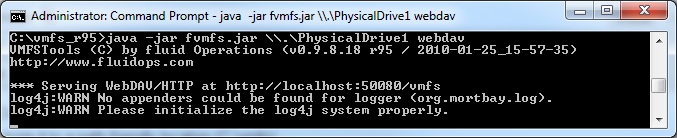
7. Share using webdav: java -jar fvmfs.jar \\.\PhysicalDrive1 webdav
8. Make sure the webclient service is running
9. Mount the drive: net use * http://localhost:50080/vmfs
10. The drive is mounted as below. The content on this drive is read-only.
 Enjoy!

Aug 6, 2013

Free download StyleShop WordPress Theme


StyleShop is a sleek and powerful eCommerce WordPress Theme that provides all the tools you need to launch a successful online store. The design is beautiful and responsive, and includes a unique mobile layout that makes browsing your website on a breeze no matter what device you are using! If you are looking for an all-in-one solution for your new business, then StyleShop is the theme for you.

Demo: http://adf.ly/TWn8W
Download now (1.3) at: http://adf.ly/TWnD7

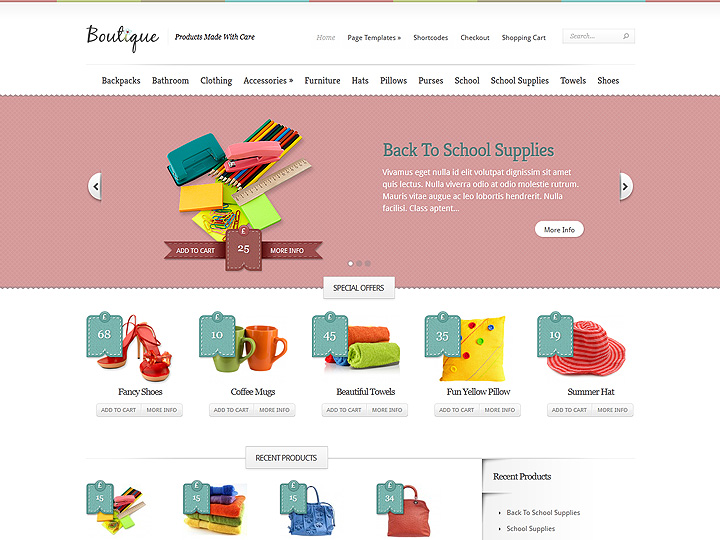
Free download Boutique WordPress Theme

Boutiques give you the power to open your own online storefront. The theme has been built to integrate with some of the most popular eCommerce plugins available, allowing people to use their favorite system without any conflicts.

Demo: http://adf.ly/TWm3g
Download now (Boutique_3.0) at: http://adf.ly/TWmbd

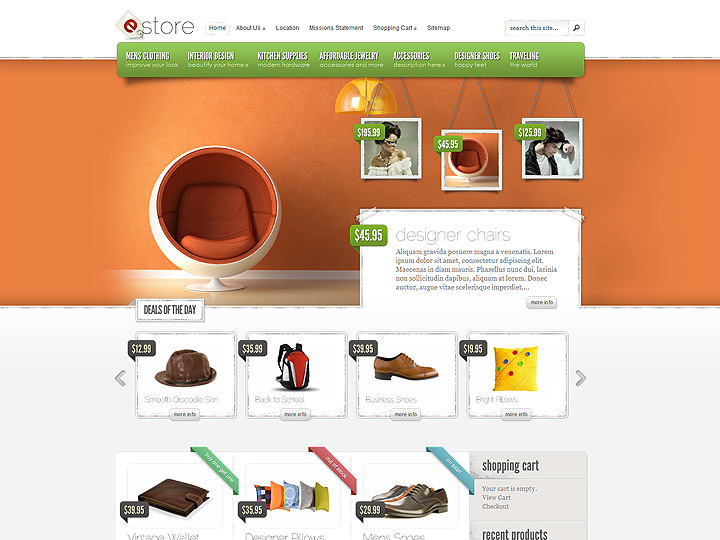
Free download eStore WordPress Theme from Elegantthemes


eStore provides an elegant solution for those looking to sell products online. The theme is easy to configure, and offers integration options with some of the most popular (and free) ecommerce plugins, including eShop and Simple PayPal Shopping cart. Also, due to the open-ended nature of the design, adding support for additional shopping carts won't cause a headache. If you are ready to bring your business online, then get started today with eStore!

Demo: http://adf.ly/TWlGg
Download now (eStore 4.3) at: http://adf.ly/TWl9r

Jun 6, 2013

Dreamhost coupon saves 97$ OFF

Fill this coupon "GET97DOLLARSOFF" to get off 97$ on any Dreamhost hosting plan, simple :)
http://dreamhost.com/web-hosting/

Jun 4, 2013

Check here to get Free Kindle copy of vSphere 5.0 Clustering Deepdive and vSphere 4.1 HA and DRS Deepdive

Yes, it's not a joke, it's completely free for 48 hours offer, Wednesday June the 5th and Thursday June the 6th. In US Kindle Store you can download the kindle copy of both these books for free. Duncan Epping (the author of these ebook) put this promotion on his blog on 28 May

So don't forget either Wednesday June the 5th or Thursday June the 6th, it might be the only time this year it is on promo.
Source: http://www.yellow-bricks.com/2013/05/28/free-kindle-copy-of-vsphere-5-0-clustering-deepdive/

Jun 3, 2013

Make easy money on your iOS devices with tapbooty

Today, i will show you a new app to make money on your iOS devices (iphone, ipad, ipod,..), it's called Tapbooty. This app give you more chances to make money easier, faster and it's real. When you reach 1000 booty coins, you can withdraw and receive the money immediately via paypal, Amazon, etc. Here’s how to earn: 

Step 1: Go to https://www.tapbooty.com/r/6bguWW5/ on your iOS devices using Safari Browser (Don’t forget to type exactly address above to reveive 100 points)
Step 2: Tap on "Name That Friend" and login to Tapbooty with your Facebook account.
Step 3: Tap on “Name That Friend” again -> Earn Booty Coins. You will see a list of apps that you can earn a lot of points. You can see points under its name.
Step 4: Now just tap on any app you want to install. Go ahead and install it, use for 30 seconds. Go back to Tapbooty and receive your points.
Step 5: When you reach 1000 more points, go back to https://www.tapbooty.com/r/6bguWW5/, tap on "Name That Friend". This time, you have to tap on "Play For xxx Prize Points", answer an easy question and tap on "Convert to Rewards Now". And here you have a chance to choose which payment services do you want (paypal or Amazon, etc).

That's it, comment below to share your earning experiences :). 
Good luck!

 
Powered by Blogger.