Windows VirtualPC with XP Mode for Windows 7 is now availabe to everyone.Windows Virtual PC provides the capability to run multiple Windows environments such as Windows XP Mode from your Windows 7 desktop. Windows Virtual PC requires a CPU with the Intel™ Virtualization Technology or AMD-V® feature turned on. This feature must be enabled in the system BIOS.
The beta version is available earlier in April, 2009. The final version will released on 22, Oct and it will be compatible with Windows 7 Professional, Enterprise and Ultimate.
Download: http://www.microsoft.com/windows/virtual-pc/download.aspx
Read here: To enable Windows Aero Glass in Windows Virtual PC
Aug 7, 2009
Download Windows Virtual PC with XP Mode for Windows 7

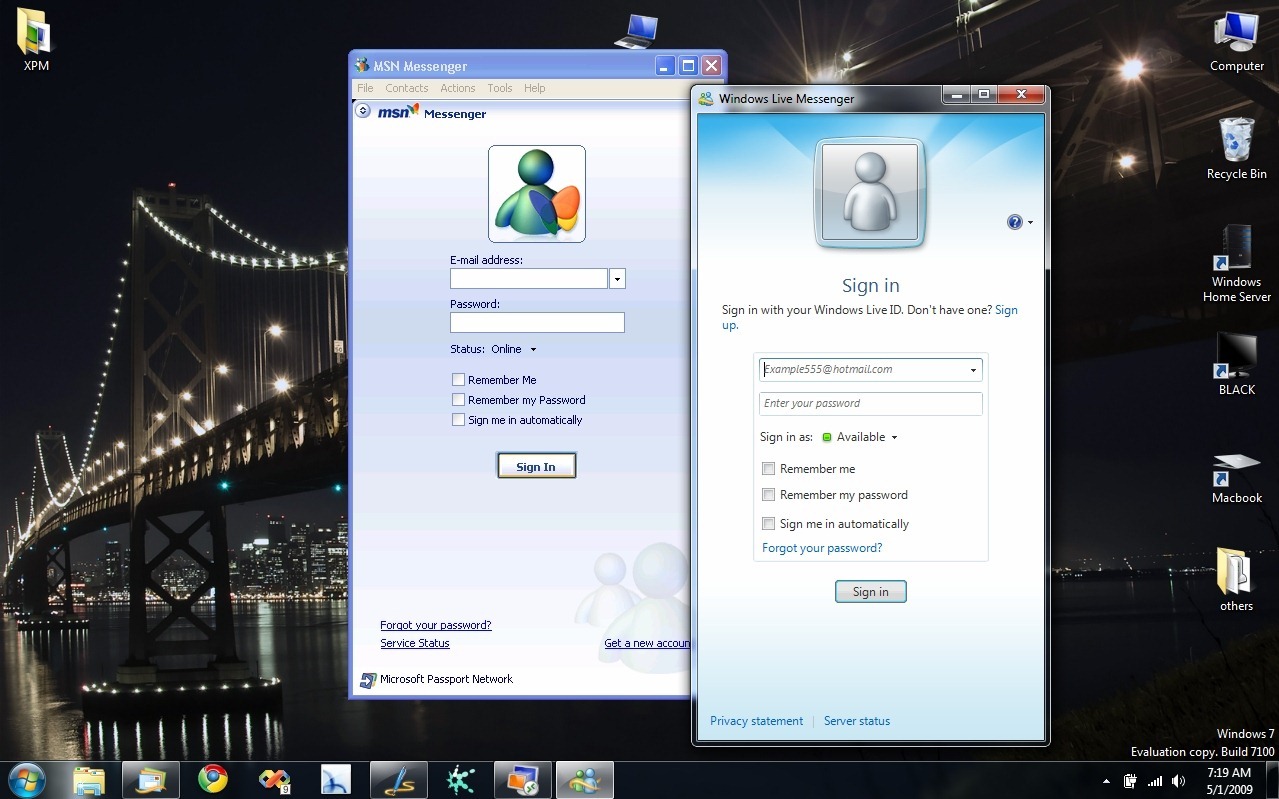

Enable Aero Glass in Windows Virtual PC
Windows Virtual PC along with XP Mode (RC) was released yesterday for Windows 7 Ultimate, Enterprise and Professional users. We all know that Virtual PC 2007 didn’t have the support to enable Windows Aero in guest machines because of the built-in VM virtualized graphics driver which couldn’t support true GPU hardware acceleration. Thanks to the powerful set of “Integration Components” in Windows Virtual PC and enhanced version of Remote Desktop in 7, we can now have full Aero Glass experience in Windows 7 VMs provided the host machine has Windows Aero enabled. To enable Aero Glass in your VMs running 7:
Windows Virtual PC along with XP Mode (RC) was released yesterday for Windows 7 Ultimate, Enterprise and Professional users. We all know that Virtual PC 2007 didn’t have the support to enable Windows Aero in guest machines because of the built-in VM virtualized graphics driver which couldn’t support true GPU hardware acceleration. Thanks to the powerful set of “Integration Components” in Windows Virtual PC and enhanced version of Remote Desktop in 7, we can now have full Aero Glass experience in Windows 7 VMs provided the host machine has Windows Aero enabled. To enable Aero Glass in your VMs running 7:
Step 1: Make sure that your host machine has Windows Aero enabled. Right click on desktop, click on Personalize, and choose one of the “Aero Themes” to enable Windows Aero with glass.
Step 2: Make sure that your guest VM has the latest version of “Virtual PC Integration Components” installed. On Windows Virtual PC, click on Tools->Install Integration Components.
Step 4: Your guest VM will now be logged off. Log-in again and voila! You will now have fully-featured Aero glass enabled guest VM running Windows 7!
NOTE: If you didn’t immediately get to see Aero enabled then right click on desktop, click on Personalize, and choose one of the “Aero Themes” in VM to enable Windows Aero with glass.
I have tested this on a host machine running Windows 7 Ultimate (RTM x64) with a guest VM running Windows 7 Ultimate (RTM x86).
Click here to read more on Windows Virtual PC and its “Integration Features” for Windows 7.
Download Windows Virtual PC for Windows 7
source: redmondpie.com
Windows 7 RTM Available Today for MSDN & TechNet Subscribers
Today, as mentioned in previously post, MSND & Technet Subscribers will be able to download Windows 7 RTM. Qote from Windowsteamblog website: As we previously announced, today MSDN & TechNet Subscribers will be able to download Windows 7 RTM in English. On October 1st, the remaining languages will be released. The bits are available now! And tomorrow, our Volume License (VL) customers with an existing Software Assurance (SA) license will be able to download Windows 7 RTM in English via the Volume License Service Center (VLSC). In a few weeks, the remaining languages will become available to them. If you are a VL customer without a SA license, you will be able to purchase Windows 7 through Volume Licensing on September 1st. For more information on Windows 7 Availability, please see this blog post. The post has been updated - including a nice chart.
Today, as mentioned in previously post, MSND & Technet Subscribers will be able to download Windows 7 RTM. Qote from Windowsteamblog website:
If you are a subscriber, go totechnet and MSDN website to download now !

BlueScreenView - View Blue Screen of Dead Information
Blue screen is nothing new for windows user and it happens when windows encounter critical system error which can cause to system shutdown in order to prevent further damage. The causes of blue screen are normally due to incompatible DLLs or bugs in kernel of the operating system, physical faults such as faulty memory, power supplies, overheating of computer components and hardware running beyond its specification limits. When blue screen happen, it will create a mini dump file which contains information about the crash and this information could be very useful to analyze what is wrong that caused the blue screen. Now with BlueScreenView, it allows you to view the mini dump file information easier and faster, besides ability to highlight suspected drivers that caused the crash as well.

BlueScreenView is able to scan all mini dump files created during blue screen crash and displays the information for quick glance. Every crash generates its own dump file and these dump files are listed in the upper pane with filename, date/time of the crash, and the basic crash information as displayed in the blue screen such as Bug Check and 4 parameters. To view the details of the device drivers loaded during the crash like product name, file version, company, address in stack , from/to address and etc, you can view it at the lower pane and drivers that their addresses found in the crash stack will be highlighted with pink color, that will definitely help you identifying suspected drivers that cause the crash easily. Currently, the lower pane has 3 different view modes (Options -> Lower Pane Mode) in which you can switch to any one of them as you preferred. All Drivers mode displays all drivers that were loaded during crash and drivers that their addresses were found in the stack will be marked with pink color. Only Drivers Found In Stack mode displays drivers with addresses found in the stack of the crash only and Blue Screen in XP Style mode displays a blue screen that similar to what windows displayed during crash.
BlueScreenView v1.00 is absolutely free to download and without an any installation required, just run the executable file to display dump file details. While it is compatible to run on Windows XP/Server 2003/Server 2008/Vista/7, only 32-bit system is supported and dump files generated by 64-bit system will not be able to read by BlueScreenView at this moment.
Aug 6, 2009
Windows 7 Themes Free Download
Windows 7 has included support for theme packs for easy download. Theme packs which are cabinet files with an extension of .themepack, and consist of a .theme as well as any number of image, sound, icon, and mouse cursor files. With theme, user can customize and personalize colors of the window chrome, desktop background, sound set, and desktop slideshow settings. With theme packs support, Windows 7 also allows user to easily switch between themes installed. Windows 7 has included support for theme packs for easy download. Theme packs which are cabinet files with an extension of .themepack, and consist of a .theme as well as any number of image, sound, icon, and mouse cursor files. With theme, user can customize and personalize colors of the window chrome, desktop background, sound set, and desktop slideshow settings. With theme packs support, Windows 7 also allows user to easily switch between themes installed. Slide show themes More theme packs are available as country-specific themes, which available for download as part of Windows 7 localization packs (local packs). Each of these regional localized themes consists of six desktop backgrounds each at 1920×1200 resolution, which depict both famous places in those countries (such as Stonehenge and the Sydney skyline) as well as country scenes. A number of sound schemes are included, each associated with an included theme: Afternoon, Calligraphy, Characters, Cityscape, Delta, Festival, Garden, Heritage, Landscape, Quirky, Raga, Savanna, and Sonata.
By default Windows 7 comes with, obviously, “Windows 7″ theme with a desktop background codenamed “Harmony” and the same sound set from Windows Vista. There are also six new Aero-based themes included, i.e. Architecture, Characters, Landscapes, Nature, Scenes. For users who looking for themes for Windows 7, Microsoft provides more free Windows 7 themes for free download on its Windows 7 site. Some early released themes can already be downloaded with the following direct download links.
Germany
Nature
Japan
United Kingdom
United States
Beaghmore Stones (Northern Ireland, UK)
Blossoms & Mt Fuji (Japan)
Butterfly
College of Fine Arts (Dresden, Germany)
Crater Lake Sunset (Oregon, USA)
Hana Highway (Hawaii, USA)
Isle of Lewis (Scotland, UK)
Llanrwst (Wales, UK)
Maple Leaves (Japan)
Niers Niederrhein (Germany)
Rocky Seashore
Shi Shi Beach (Washington, USA)
Sunset Gold & Blue
Tokyo Tower (Tokyo, Japan)


Vexira Antivirus Professional Free Download with 1-Year Serial Registration Key
Vexira Antivirus from Central Command is a easy to manage comprehensive virus defense solution for Microsoft Windows, which also provides anti-virus solution to Samba, Linux, Novell, Solaris, FreeBSD, OpenBSD, AIX, GroupWise, various mail server (supports Sendmail, Milter, Postfix, Qmail, Courier, Exim, and SMTP Relay). Vexira Antivirus for Windows can be used to protect a single home computer, a small office network, or an enterprise with thousands of workstations and servers.
Vexira Antivirus from Central Command is a easy to manage comprehensive virus defense solution for Microsoft Windows, which also provides anti-virus solution to Samba, Linux, Novell, Solaris, FreeBSD, OpenBSD, AIX, GroupWise, various mail server (supports Sendmail, Milter, Postfix, Qmail, Courier, Exim, and SMTP Relay). Vexira Antivirus for Windows can be used to protect a single home computer, a small office network, or an enterprise with thousands of workstations and servers.
Vexira Antivirus protects desktops, workstations and laptops against viruses and malicious programs in real-time. It defends both local and mobile workers for maximum system availability and performance with reduced downtime due to virus attacks and includes integrated Microsoft Outlook and Office virus protection. The Vexira Antivirus technology protects against viruses, worms, trojans, adware, spyware and hostile ActiveX and Java applications.

Vexira Antivirus Professional
Features of Vexira Antivirus
* Multi-platform, multi-tier, enterprise-wide vrus protection
* Can be centrally managed, updated and deployed
* Low system requirements
* Industry leading and innovative virus protection technology
* Easy to use with simple installation and deployment
* Configurable virus protection policy enforcement
* Complete coverage by scanning Internet downloads, floppy disks, e-mail attachments, network drives, shared files, CD-ROM, online services, ZIP drives, tape backups
* Complete automatic updating
* Low total cost of ownership (TCO)
In fact, now everyday can grab a copy of Vexira Antivirus with total cost of zero (0), which normally costs $34.95 for a year of subscription. As part of promotion with Akron Beacon Journal, Central Command is giving away a genuine license of Vexira Antivirus for Windows with valid and legitimate registration serial key code. The registration data is valid for one year from June 28 2009 to June 28 2010.
To get your free copy of Vexira Antivirus, firstly download the Vexira Antivirus setup installer using one of the following direct download link:
Windows 98/ME/2000/XP: winprof.exe
Windows Vista (32-bit): winprof.exe
Windows Vista (64-bit): winprof.exe
The run the setup installer to install Vexira Antivirus Professional. The setup wizard will prompt to enter registration data. Enter the following registration information (click on radio button of “Enter registration data” instead of “Activation or registration later”), as provided by promotion page at http://www.centralcommand.com/abj.html, to unlock the trial version of Vexira Antivirus:
User name: ABJ Reader
Registration key: ESKSU-UMREA-A8CBT
Continue with installation process, and the full version unlocked Vexira Antivirus Professional will be installed and protecting the computer. Vexira Antivirus for Windows supports Windows 98 Second Edition, Windows Me, Windows NT 4.0 Workstation with Service Pack 3 or above, Windows 2000 Professional, Windows XP Home and Professional and Windows Vista.
Source: mydigitallife
Aug 5, 2009
How many people are already MCITP Certified worldwide?
Gaining an MCITP takes a generous amount of effort which not everyone is willing to put in. Currently there are 55,000 people certified with some sort of MCITP Certification worldwide. Out of the 12 different MCITP Specializations which are available MCITP Enterprise Administrator is the most popular with almost 15,000 people qualified. Next in line is MCITP Enterprise Support Technician with 10,000 and shortly followed by MCITP Server Administrator with 9,000 people certified.
If you really wanted to stand out from the crowd as an early adopter of a MCITP Specialisation the MCITP Business Intelligence Developer 2008 certification would be the one to pick with less than 200 people certified. The most popular new generation Microsoft Exam is MCTS Windows Vista Configuration with over 70,000 people certified.
If you are getting put off by the number of people MCITP certified, don’t be as in comparison to the amount of people that are MCSE or MCSA Certified in Windows Server 2003. There are 360,000 people MCSA 2003 Certified and 190,000 MCSE 2003 Certified. Even though these numbers are so high, there is still job demand for people Certified in these areas all over the world.
Becoming an early adopter of an MCITP Certification will definitely land you a job as companies switch over to the Windows Server 2008 framework as you will have the required skills and knowledge of the new technologies and features which people certified in Windows Server 2003 aren’t even aware exist!
Check out Microsoft’s Website for a complete list of people with MCP’s worldwide.
Source: mcitpguide
Subscribe to:
Posts (Atom)


